Hachibu
Androidで試す Try on Android

Android クローズドテスト 募集中 Android Closed Beta — Join Now

ざっくりで、
続く食事ログ。
Rough logging.
Lasting habit.

9つのボタンを、タップだけで。 Nine buttons. One tap each.

計らない、調べない、迷わない。 No measuring. No searching. No deciding.

§ 01 — Concept

食事記録のいちばんの敵は、
「ちゃんと書こう」という気持ち。
The biggest enemy of meal tracking
is trying to do it perfectly.

続かない理由は、だいたい入力にある。
だから Hachibu は、ちゃんと書かなくても、
ざっくりで成立する設計から始めました。

Most people quit because of the input — not the habit.
Hachibu starts from the opposite:
roughly is enough. You don't have to get it right. You just have to get it done.

§ 02 — Why roughly works

ざっくり、でも8割。 Rough. But close enough.

01

181 → 9 foods → 9

食材 → ボタン everyday → buttons

栄養が近い食材は、同じボタンへ。 Similar nutrition? Same button.

日常の 181 種の食材を、栄養が近いもの同士で 9 つに集約。同じボタンの中なら、選んだ食材が違ってもカロリーはほぼ変わりません。

Everyday foods, grouped by nutritional similarity into nine buttons. Pick any food in the same category — the calories are close enough to count.

02

105 / 200 165 / 210

鶏むね vs もも · kcal chicken breast vs thigh · cal/100g

違いが大きい食材は、別のボタンへ。 Big difference? Separate buttons.

鶏むね (105 kcal) と鶏もも (200 kcal) は約 2 倍の差。明らかに違うものは別のボタンに分けてあるので、選んだ方の値で記録されます。

Chicken breast (165 cal) and thigh (210 cal) differ enough to matter. When the gap is real, they get separate buttons — so you always log the right one.

03

9 → 1

9 ボタン → あなた一人 9 buttons → just you

ボタンは、あなたに寄っていく。 The buttons adapt to you.

ふだんの食事に合わせて、記録される値は少しずつ調整されます。続けるほど、あなたの食生活に近づきます。

The more you log, the closer Hachibu gets to your actual eating habits. Keep going — it gets more accurate.

§ 03 — Features

急ぐ日も、しっかり残したい日も。 Rush days. Unhurried days. Hachibu handles both.

01

Quick Log

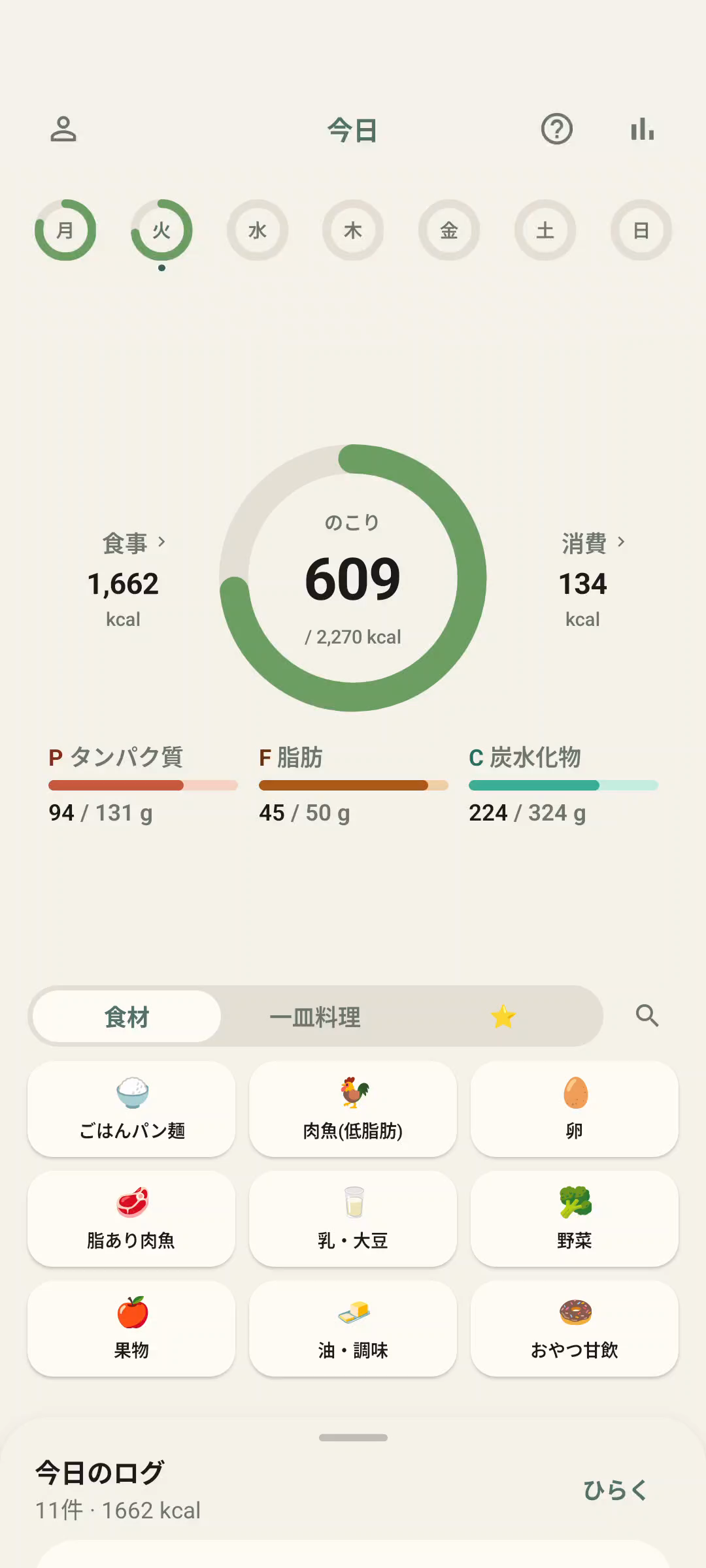
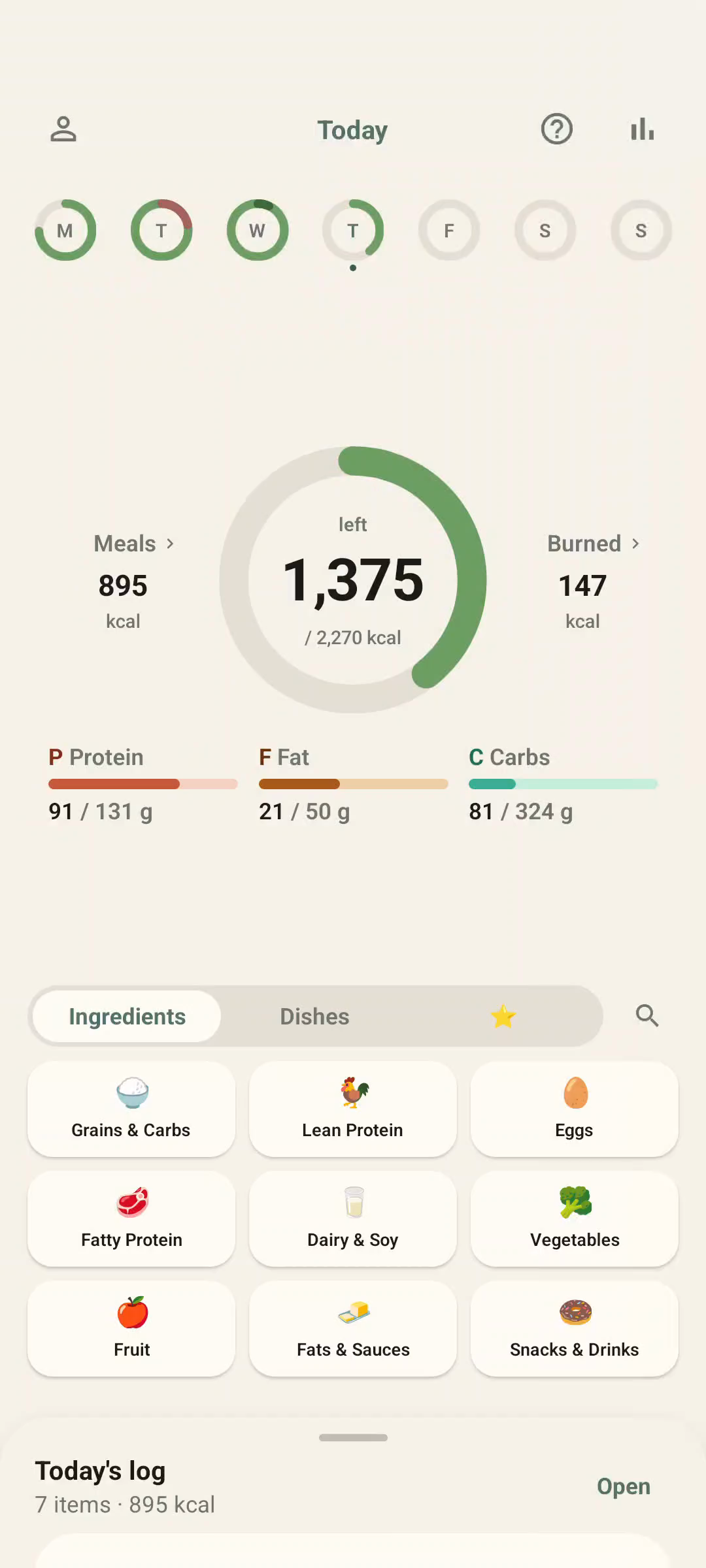
食事は、9つのボタンから。 Nine buttons. That's your whole menu.

いつもの食事を 9 つのボタンから選ぶだけ。1 タップで kcal と PFC が記録され、迷う時間はゼロ。

Pick from nine category buttons. One tap logs calories and macros. Zero time spent deciding.

食材 / 一皿料理Ingredients / Dishes
タブで切替Switch by tab
9バケット9 categories
1タップで登録One tap to log
kcal · PFCcal & macros
即時にスナップLogged instantly

02

Long-press Detail

余裕がある日は、長押しで深く。 Time to spare? Hold for more.

同じボタンを長押しすれば、種類・調理法・量まで残せます。残したい日に、残したい分だけ。続けることを邪魔しません。

Long-press the same button to log type, cooking method, and amount. As much or as little as you feel like. The app doesn't push back.

種類・部位Type / cut
鶏ささみ / 白身魚 …breast, thigh, fillet…
調理法Cooking method
あっさり / 油あり / 揚げlight, oily, fried
Amount
小・中・大 + 微調整3 sizes + fine-tune

§ 04 — FAQ

よくある質問。 Common questions.

量がぴったりじゃないけど大丈夫? What if my portion doesn't match exactly?

標準的な1人前で記録します。大盛り・小盛りはタップ後の画面で切り替えられます。微調整より「続けやすさ」を優先した設計です。

Hachibu logs a standard single serving. After tapping, you can switch to large or small. We prioritize keeping it easy over getting it perfect.

1ボタンに何種類も入っていて、ざっくりすぎない? Isn't one button for multiple foods too rough?

各ボタンに含まれる食材は、よく食べる範囲ならタップ値とほぼ同じカロリー範囲に収まる設計です。ボタンごとの幅は「食材ボタンの中身」「料理ボタンの中身」で確認できます。

Foods within a button are grouped by nutritional similarity, so the calorie range stays tight for everyday eating. The rare outliers get their own button.

写真で記録できないの? Why no photo logging?

撮影 → 認識 → 確認の手間で、結局時間がかかり続かない原因になりやすいため、あえてタップ式にしています。ボタンを数回タップするだけで終わるので、毎日続けやすい設計です。

Photo → scan → confirm adds more steps than it looks. It's one of the most common reasons people stop. A few taps and you're done — every day.

もっと厳密に計算したい場合は? What if I want to track more precisely?

このアプリは「ざっくり、続ける」を優先した設計です。1g単位で計算したい方は、食品成分表ベースの計測アプリ (あすけん等) との併用がおすすめです。

Hachibu is built for "roughly, consistently." For gram-level tracking, a food-database app will serve you better. The two aren't mutually exclusive.

§ 05 — Start

ざっくり記録、
はじめてみる。
Start logging,
roughly.

いま試せるのは Android のクローズドテスト。
iPhone の方は、準備が整い次第お知らせします。

Android closed beta is open now.
iPhone version coming soon — sign up and we'll let you know.

  • 全機能、無料Free, full access
  • クレカ不要No credit card
  • 合わなければアンインストールするだけUninstall any time

iOS版の準備ができたら、
お知らせします。
We'll let you know
when iOS is ready.

登録はメールアドレスだけ。他には何も聞きません。

Just your email. Nothing else.

  • iOSローンチ時の1通だけお送りします One email when iOS launches
  • 他社への共有・販売はありません Never shared or sold

登録すると プライバシーポリシー に同意したものとみなします。 By subscribing you agree to our Privacy Policy.

Android クローズドテスト
参加の 2 ステップ
Join the Android Closed Beta
— 2 steps

Google グループに参加すると、テスターとして Play Store からインストールできます。

Join the Google Group to install Hachibu from the Play Store as a tester.

  1. 1
    Google グループに参加 Join the Google Group 下のボタンから「参加」を押すだけ。承認は不要です。 Tap the button below and join. No approval needed.
  2. 2
    Play Store からインストール Install from the Play Store グループ内のリンクから Play Store を開いてインストール Open the link in the Group to install from the Play Store
Google グループを開く Open Google Group

Google アカウントでのログインが必要です。 A Google account is required.